本文起草稿于 2025-01-31
实现效果是这样的:
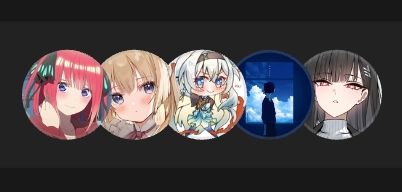
实现方法1 —— FittedBox
原本使用小尺寸的 SizeBox 包裹住大尺寸的元素时,元素的宽高会变成跟随小尺寸 SizeBox 的宽高,
在中间夹一层 FittedBox(fit: BoxFit.none) 来避免元素宽高变化。
示例代码(可直接运行):
import 'package:flutter/material.dart';
void main() => runApp(const MyApp());
class MyApp extends StatelessWidget {
  const MyApp({super.key});
  @override
  Widget build(BuildContext context) {
    return MaterialApp(
      title: 'Flutter Demo',
      home: const MyHomePage(title: 'Flutter Demo Home Page'),
    );
  }
}

class MyHomePage extends StatefulWidget {
  final String title;
  const MyHomePage({super.key, required this.title});
  @override
  State<MyHomePage> createState() => _MyHomePageState();
}

class _MyHomePageState extends State<MyHomePage> {
  @override
  Widget build(BuildContext context) {
    return ListView.builder(
      padding: const EdgeInsets.all(16.0),
      // reverse: true, // 开启 reverse 可以使用相反的堆叠层级,但同时排列顺序也会反转
      scrollDirection: Axis.horizontal,
      itemBuilder: (context, index) {
        return SizedBox(
          width: 32 - 8,
          height: 32 - 8,
          child: FittedBox(
            fit: BoxFit.none,
            child: SizedBox(
              width: 32,
              height: 32,
              child: itemBuilder(context, index),
            ),
          ),
        );
      },
      itemCount: 4,
    );
  }

  Widget itemBuilder(BuildContext context, int index) {
    // 用纯色模拟图片
    return Container(
      width: 32,
      height: 32,
      decoration: BoxDecoration(
        color: [Colors.red, Colors.blue, Colors.green, Colors.yellow][index],
        borderRadius: const BorderRadius.all(Radius.circular(50.0)),
      ),
    );
  }
}
运行结果:

缺点:
重叠部分触发点击事件的层级是错的,例如点击红色和蓝色元素重叠部分,理应触发蓝色元素的点击事件,实际触发的确是红色元素;不过,在使用了 reverse: true 进行反转时,触发点击事件的层级就是正确的了。
实现方法2——Stack + Position
很普通的绝对定位,通过设置 clipBehavior: Clip.none 即可允许元素溢出。
示例代码,可直接运行:
import 'package:flutter/material.dart';
void main() => runApp(const MyApp());
class MyApp extends StatelessWidget {
  const MyApp({super.key});
  @override
  Widget build(BuildContext context) {
    return MaterialApp(
      title: 'Flutter Demo',
      debugShowCheckedModeBanner: false,
      theme: ThemeData(colorSchemeSeed: Colors.blue),
      home: HomePage(),
    );
  }
}

class HomePage extends StatelessWidget {
  @override
  Widget build(BuildContext context) {
    return SizedBox(
      width: 120,
      height: 60,
      child: Stack(
        clipBehavior: Clip.none, // 允许子部件溢出
        children: List.generate(colors.length, (index) {
          return Positioned(
            left: index * 30.0, // 在这调节重叠区域大小
            child: CircleAvatar(
              radius: 30,
              backgroundColor: [Colors.blue,Colors.green,Colors.orange,Colors.purple][index],
            ),
          );
        }),
      ),
    );
  }
}
效果: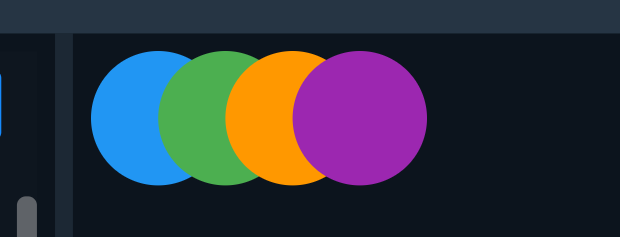
想反转堆叠的话 Positioned 内的 left 改成 right 即可;
实现方法3——OverflowBox
示例代码,可直接运行:
import 'package:flutter/material.dart';
void main() => runApp(const MyApp());
class MyApp extends StatelessWidget {
  const MyApp({super.key});
  @override
  Widget build(BuildContext context) {
    return MaterialApp(
      title: 'Flutter Demo',
      debugShowCheckedModeBanner: false,
      theme: ThemeData(colorSchemeSeed: Colors.blue),
      home: HomePage(),
    );
  }
}

class HomePage extends StatelessWidget {
  @override
  Widget build(BuildContext context) {
    return Stack(
      children: [
        for (int i = 0; i < 4; i++)
          Align(
            alignment: Alignment.centerLeft,
            child: Container(
              margin: EdgeInsets.only(left: i * 50.0), // 调整重叠部分大小
              child: OverflowBox(
                maxWidth: 100, // 限制最大宽度
                child: CircleAvatar(
                  radius: 25,
                  backgroundColor: [Colors.blue,Colors.green,Colors.orange,Colors.purple][i],
                ),
              ),
            ),
          ),
      ],
    );
  }
}
参考:
https://www.jianshu.com/p/79698e47f1e6
https://blog.csdn.net/m0_55635384/article/details/128735969
版权属于: Kerrinz
本文链接:https://kerrinz.com/archives/679.html
作品采用《知识共享署名-非商业性使用-相同方式共享 4.0 国际许可协议》进行许可,转载请务必注明出处!